




Headless WordPress in 2026: Architecture, Tradeoffs, and Implementation Patterns
We recently published The Headless WordPress Evolution: Speed, Security, and SEO in the AI Era, a business-focused piece covering the what and the why of headless architecture: the performance and security benefits, the GEO angle, and the case for decoupling your CMS. It’s intentionally written for stakeholders and decision-makers.
This article is the technical companion. If you’re the engineer who now has to build the thing, this goes deeper, into the actual WordPress rendering pipeline, rendering strategy tradeoffs (SSG vs SSR vs ISR), REST vs WPGraphQL, the security model’s real limits, and the operational costs the sales version glossed over.
The WordPress Rendering Pipeline: What You’re Actually Replacing
To understand why headless is faster, you need to understand what traditional WordPress does on every request.
A page request in a monolithic WordPress setup triggers a full PHP execution cycle: WordPress loads
wp-settings.php, bootstraps the plugin API, fires the init hook (which initialises every active
plugin), runs WP_Query against MySQL, loads the theme’s functions.php, and then renders a template through
get_template_part() calls. On a reasonably sized site, say, 40 plugins, a page builder, a caching layer,
this stack can take 400–800ms of server-side processing before a single byte reaches the user.
Even with a full-page caching plugin like WP Rocket or W3 Total Cache, you are still serving a pre-rendered HTML blob
from a single origin server. You’re caching the output, not redesigning the architecture.
The core bottleneck is TTFB (Time to First Byte). Google’s guidance recommends keeping TTFB under
800ms, but for a strong LCP score you realistically need to be under 200ms. A PHP stack hitting a database cannot
consistently achieve this without caching, and caching introduces its own consistency problems for dynamic content.
The Headless Architecture Stack
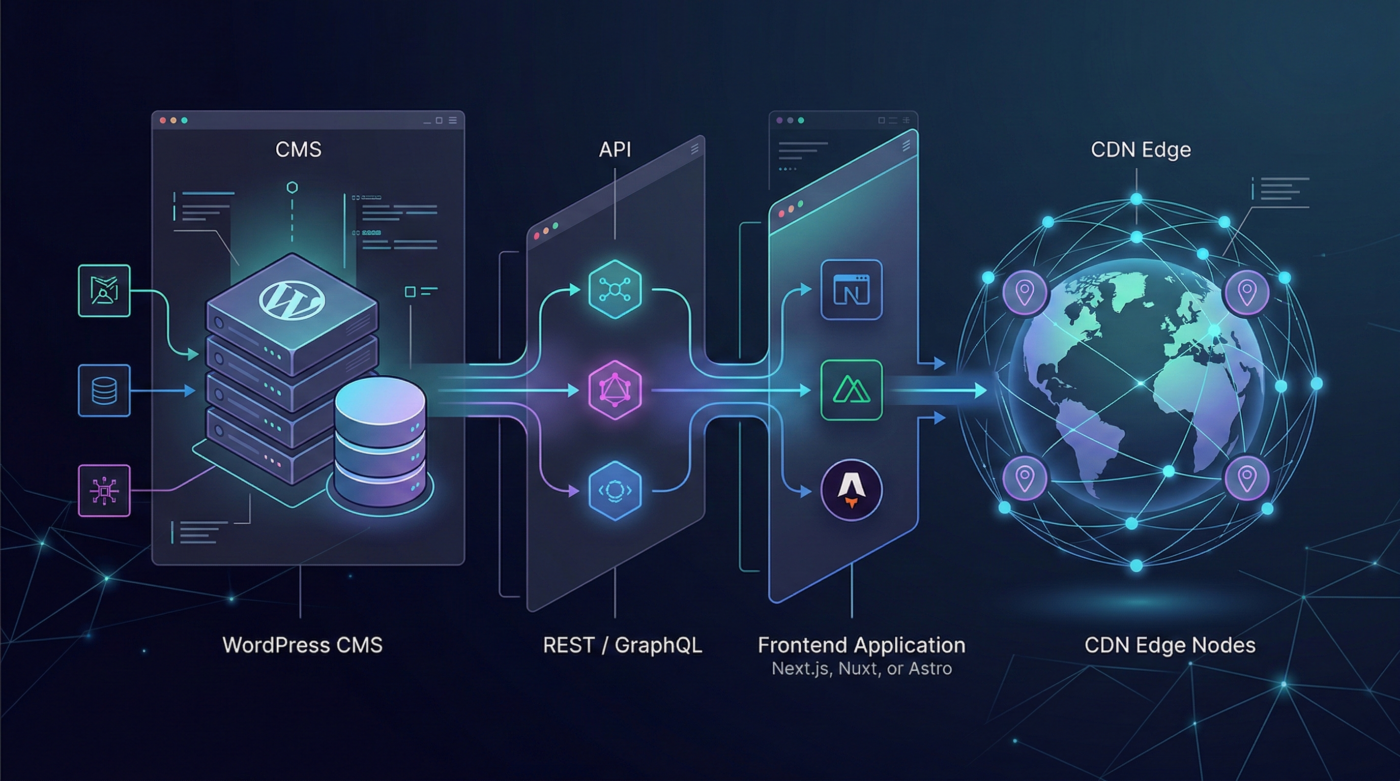
Decoupling WordPress means separating the content layer from the presentation layer
entirely. Here’s what that looks like in practice:
| Layer | WordPress Backend (Content Layer) | Frontend Application (Presentation Layer) |
|---|---|---|
| Primary Role | Content management and editorial workflow | Rendering and delivering the user experience |
| Technology | WordPress (PHP, MySQL) | Next.js, Nuxt, Astro, or other modern frameworks |
| Content Delivery | REST API or GraphQL (WPGraphQL) | Fetches content via API during build or runtime |
| Rendering | None — provides structured content only | SSG, SSR, or ISR rendering strategies |
| Hosting | Private server, VPS, or container | CDN-based hosting (Vercel, Netlify, Cloudflare Pages) |
| Security Exposure | Often restricted to private network or allowlisted IPs | Public-facing static or server-rendered frontend |
| Responsibilities |
|
|
The WordPress instance can live on a private subnet or behind a reverse proxy that only exposes the
/wp-json/ or /graphql endpoint to an allowlisted set of IPs (typically your build servers or
API gateway). The public internet never touches your WordPress install directly.
API Layer: REST vs WPGraphQL
WordPress ships with a REST API out of the box. It works, but has significant limitations for headless use:
WP REST API shortcomings:
- Fetching a post includes 40+ fields you almost certainly don’t need (the
_linksobject alone is verbose). - No native support for fetching related data in a single request; you’ll be chaining calls for post meta, terms, and ACF fields.
- No real-time subscription support.
WPGraphQL (wp-graphql/wp-graphql) solves the over-fetching problem by letting the client
declare exactly the shape of the data it needs:
query GetPost($slug: String!) {
postBy(slug: $slug) {
  title
  date
  excerpt
  featuredImage {
    node {
      sourceUrl(size: LARGE)
      altText
    }
  }
  categories {
    nodes {
      name
      slug
    }
  }
  seo {
    title
    metaDesc
    schema {
      articleType
    }
  }
}
}
This single query replaces 3–4 REST calls and returns only what you asked for. At build time, when you’re generating
thousands of static pages, this reduction in payload size and round-trips has a compounding effect on build performance.
When to stick with REST: If your frontend team is consuming a simple content type with no relational
complexity (e.g., a blog with standard post/category/tag relationships), the REST API is perfectly adequate. The
additional complexity of WPGraphQL isn’t always worth it.
Rendering Strategy: SSG, SSR, and ISR
This is where most headless implementations make architectural mistakes. Choosing the wrong rendering strategy per
content type is the most common performance pitfall.
Static Site Generation (SSG)
Pages are built at deploy time into static HTML. The CDN serves pre-rendered files with zero server-side processing.
Best for: Marketing pages, blog archives, documentation, landing pages, anything with a low update frequency and high read volume.
The catch: On large sites, build times become a real operational problem. A site with 10,000 posts
building with Next.js getStaticPaths can take 20–40 minutes per deploy. Any content change requires a
full or incremental rebuild.
Server-Side Rendering (SSR)
Pages are rendered on-demand by a Node.js server, similar to traditional WordPress but without the PHP overhead.
Best for: User-specific content, real-time data (stock prices, live inventory), and content that changes more frequently than you can afford to rebuild.
The catch: You reintroduce server infrastructure. Your TTFB is now bounded by your rendering server’s
response time plus the upstream WordPress API call. You need to handle caching at the CDN layer (via
Cache-Control headers and stale-while-revalidate) to prevent origin overload.
Incremental Static Regeneration (ISR)
ISR (a Next.js concept, with equivalents in Nuxt and Astro) is the most practically useful model for content-heavy
sites. Pages are statically generated, but individual routes can be marked to revalidate after a set time-to-live, or
on-demand via a webhook trigger from WordPress.
// Next.js ISR, revalidate every 60 seconds, or on demand
export async function getStaticProps({ params }) {
const post = await fetchPostBySlug(params.slug);
return {
  props: { post },
  revalidate: 60, // seconds
};
}
Combined with the WordPress save_post hook firing a revalidation webhook, you get near-instant content
updates without full rebuilds:
// In WordPress functions.php or a custom plugin
add_action('save_post', function($post_id) {
if (wp_is_post_revision($post_id)) return;

$slug = get_post_field('post_name', $post_id);
wp_remote_post(FRONTEND_REVALIDATE_URL, [
  'body' => json_encode(['slug' => $slug, 'secret' => REVALIDATE_SECRET]),
  'headers' => ['Content-Type' => 'application/json'],
]);
});
For most production headless WordPress sites, ISR is the correct default. SSG is ideal only when
your content team accepts a deploy cycle as part of their publishing workflow.
Security Model: What Actually Changes
The security benefits of headless are real, but they’re more nuanced than “there’s no database on the frontend.”
What you gain:
- The WordPress admin UI (
/wp-admin) and the REST/GraphQL API endpoint can be firewalled from the public internet entirely. - The public-facing frontend has no PHP execution surface and no database connection.
- You eliminate an entire class of WordPress-specific exploits: theme/plugin RCE vulnerabilities,
xmlrpc.phpabuse, and credential stuffing againstwp-login.php.
What you don’t gain:
- Your WordPress API is still a web application and still needs hardening (updates, rate-limits, auth, XML-RPC lockdown).
- Your frontend application has its own attack surface (secrets, API routes, third-party scripts).
- Supply chain risk persists (npm dependencies can introduce vulnerabilities).
The security improvement is architectural risk reduction, not elimination. A headless setup handled carelessly is not
more secure than a well-maintained monolith.
Core Web Vitals: What Headless Actually Moves the Needle On
Google’s Core Web Vitals are three signals: LCP (Largest Contentful Paint), INP (Interaction to Next Paint), and CLS
(Cumulative Layout Shift). Headless architecture has different leverage on each.
LCP: headless makes the most meaningful difference here. Pre-rendered HTML served from a CDN edge node
geographically close to the user can achieve consistent sub-200ms TTFB globally. The LCP element (usually a hero image
or H1) is in the initial HTML payload, not deferred behind JavaScript. Combine this with
<link rel="preload"> for your LCP image and you’re looking at LCP scores under 1s on fast connections.
INP: this measures the latency between a user interaction (click, keypress, tap) and the next visual
update. A static CDN page with minimal JavaScript will score very well here by default. The risk is over-using React for
content that doesn’t need it. If you’re shipping 400KB of JavaScript to render a blog post, your INP won’t be as good as
it could be. Astro’s islands architecture pattern (hydrating only interactive components, leaving the rest as plain HTML)
is purpose-built for this problem.
CLS: layout shift is almost entirely a frontend engineering problem, independent of whether you’re
headless or not. Reserve space for images and ads, use font-display: optional or font-display: swap
with proper fallback font metrics, avoid injecting content above existing content. Headless gives you full control over
your CSS and markup, which makes it easier to fix, but it doesn’t fix itself.
Structured Data and GEO: The Practical Implementation
Generative Engine Optimisation (GEO) is a real concern, AI-powered search surfaces are increasingly selecting cited
sources from content that provides clear, machine-readable signals about what it is and who produced it.
The advantage of a custom frontend is that you own the <head> entirely. There’s no theme or SEO
plugin inserting schema that conflicts with your own, no duplicate JSON-LD blocks, and no race conditions between
plugins.
A well-structured Article schema for a headless blog post looks like this:
// Next.js — injected via next/head or App Router metadata
const articleSchema = {
"@context": "https://schema.org",
"@type": "Article",
"headline": post.title,
"datePublished": post.date,
"dateModified": post.modified,
"author": {
  "@type": "Person",
  "name": post.author.name,
  "url": post.author.url
},
"publisher": {
  "@type": "Organization",
  "name": "Sydsen Digital",
  "logo": {
    "@type": "ImageObject",
    "url": "https://sydsendigital.com/logo.png"
  }
},
"image": post.featuredImage?.sourceUrl,
"mainEntityOfPage": {
  "@type": "WebPage",
  "@id": `https://sydsendigital.com/blog/${post.slug}`
}
};
For service businesses, adding LocalBusiness, FAQPage, and BreadcrumbList schemas
alongside your content gives AI crawlers a structured graph of what your business offers, where it operates, and how
your content is organised, increasing the likelihood of being cited in AI-generated answers.
The Real Tradeoffs: What You’re Giving Up
Headless is not universally better. Any engineer recommending it without acknowledging its costs isn’t giving you a
complete picture.
Preview complexity. WordPress’s built-in preview (?preview=true) doesn’t work natively in a headless setup because the preview creates a draft that only the WordPress backend knows about. You’ll need to implement a preview mode, Next.js has a dedicated Draft Mode API for this, but it requires custom implementation.
Plugin compatibility. A large portion of the WordPress plugin ecosystem assumes it controls the frontend. WooCommerce, membership plugins, form builders, and page builders either don’t work headlessly or require significant custom integration work. Before committing to headless, audit every plugin your content workflow depends on.
Operational complexity. You now have two deployable systems instead of one. You need CI/CD pipelines for both your WordPress instance and your frontend. You need to manage environment variables, API secrets, webhook endpoints, and revalidation logic. For a small team, this overhead is non-trivial.
Cost. A traditional WordPress site can run on a single $20/month managed host. A headless setup requires hosting for the WordPress backend, a Node.js hosting platform or serverless provider for the frontend (Vercel, Netlify, Cloudflare Pages), and potentially a CDN. The TCO is higher, and justifying it requires genuine traffic and performance requirements.
When Headless is the Right Call
Given the above, headless WordPress is the right architectural choice when:
- You have high organic traffic where LCP/INP scores directly affect acquisition (e-commerce, publisher, SaaS marketing site).
- You need the same content to power multiple surfaces: a web frontend, a React Native mobile app, a digital kiosk, and possibly voice interfaces, all consuming the same GraphQL API.
- Your security requirements mandate that no CMS backend is publicly accessible (financial services, healthcare, enterprise).
- Your frontend team has strong JavaScript/TypeScript skills and wants full control over the rendering pipeline.
- You’re building a design system that can’t be constrained by theme templates.
If you’re building a standard business website for a client who posts twice a month and has no unusual performance
requirements, headless adds complexity without proportional return. A well-configured monolithic WordPress setup with a
good caching layer and a lightweight theme can achieve 90+ PageSpeed scores without the overhead.
The right architecture is the one that matches the actual constraints of the project. Headless is a powerful tool,
knowing when to use it is the engineering judgment.